Monday, April 26, 2010

Solution: Couldn't access WAMPServer via http://localhost/

Today I tried to run the WAMP Server installed in my Windows Vista. I could start the server and when I accessed http://localhost/ in the browser, I couldn't get anything instead of a blank page. I used the same installation earlier several times and it worked fine.

I was digging inside the php.ini file and suddenly I noticed that I have Skype running. I thought there might be some issues with the ports and tried Tools->Options->Advanced->Connection and saw the option "use port 80 and 443 as alternatives for incoming connections" was checked.
I tried to remove the check mark and gave 9000 (can be any non-used ports) in the blank of "use _____ for incoming connections".

I restarted both Skype and WAMP Server.

It was cool :) I could access the WAMP homepage via http://localhost/.
My guessing was right!


So, if you came across such problem, check whether Skype or any other program uses port '80' and change it's setting.

Wednesday, March 31, 2010

Google Guice

Sometimes ago when I was working with Apache Shindig, I came across Google Guice. It is an easy way to bind interfaces to implemented classes. In the context of Apache Shindig, they use the guice binding to bind the service classes such as Person Service, Activity Service etc to the custom implemenataion classes. It is handy to use the guice model in that case since any OpenSocial container developer can bind their own implementation of these services directly through the guice model to have their custom implemenation for Apache Shindig.

Guice model can be used for such similar requirements.

Here is presenation by Google:


More details can be found at: http://code.google.com/p/google-guice/

SmartECards - A Joomla! Component


I have created a Joomla! component as my project in the University. It is a Joomla! component which is capable of sending e-cards. I will share my experience with creating my component “SmartECards”. If you are new to Joomla!, checkout http://www.joomla.org. Download the latest version and install it using the installation guide (http://www.joomla.org/download.html).

This e-cards component is created for for Joomla! 1.5 series. This 1.5 series version of Joomla! support the MVC approach creating components. MVC stands for Model-View-Controller which is a well know design pattern when it comes to web development.

Actually Jooma! components are packed as a zip file which is installed from the admin console. We have to create the model, view and controller for the component and add an XML manifest file which tells about the component and how it should be installed etc. This is the standard way of installing a Joomla! components.

But when I was developing this component I used a shortcut way since I wanted to test the component after some functionality is added. Once the component is finished developing, we can pack accordingly to create the component archive file.

The initial step is to register the components to Joomla!. All the components installed in Joomla! has an entry in the Joomla! database.

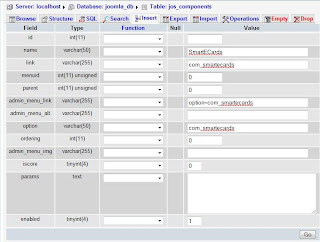
I’ll show the steps of creating a database entry using the phpmyadmin console. In the phpmyadmin select the database which you are using for the Joomla! installation. Tables in this database has the prefix “jos_” by default. If you have specified any other prefix during Joomla! installation, use that name instead of “jos_”. There will a table named “jos_components”. This is where the installed Joomla! components are registered.


Click on the insert tab and fill it as shown below.

name : SmartECards

link : com_smartecards

admin_menu_link: option=com_smartecards

option: com_smartecards

Keep the other fields with their default values.

When you click “Go”, the entry will be created.

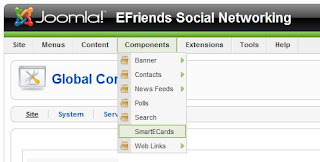
Now if you go to the Joomla! administrator’s page (/administrator/index.php?), you can see “SmartECards” listed under components.


When you click on this, you will get a 404 error message. This is because we haven’t written the code to appear when it is clicked. If you have reached this place, everything is fine up to this point.

Relax a bit :)

I will continue from here in my next post.


Saturday, September 5, 2009

Google Wave

Today I came across a very interesting link. It's about Google Wave and I found it worth sharing something about the latest communication tool "Google Wave".

Google Wave is a new tool for communication and collaboration on the web. It is an open source project yet to be launched to public use.

Features of Google Wave:
  • Can communicate and work together with rich text, photos, videos, maps and etc.
  • It differs from the standard email communication in many ways
  • Any participant can reply anywhere in the messages, edit, add content and add new participants too
  • New participants can playback to see the earlier conversation
  • Instant messages are transmitted character by character, so we don't have to wait until some one finish typing and hit enter
  • Live transmission of data makes a real-time interaction
  • Easy drag n drop to attachment
  • Server-based spelling suggestion
  • A large number of participants can edit a single document real-time and each can be seen separately
  • Support many other gadget extensions
  • And a lot more
The list about contains only a few features which came to my mind. A very nice demo can be seen at:


The official blog:


Thursday, July 30, 2009

10 Principles for Peace of Mind

This is one of the most valuable article which have I read. I found this in Facebook and my thanks to the author and the person who shared this.
These words have been a good medicine for me many times, to get rid of my regrets, cure my pains. I believe that, posting this in my blog will make me to read this regularly.

1. Do Not Interfere In Others' Business Unless Asked:
Most of us create our own problems by interfering too often in others' affairs. We do so because somehow we have convinced ourselves that our way is the best way, our logic is the perfect logic and those who do not conform to our thinking must be criticized and steered to the right direction, our direction. Mind your own business and you will keep your peace.

2. Forgive And Forget:
This is the most powerful aid to peace of mind. We often develop ill feelings inside our heart for the person who insults us or harms us. We nurture grievances. This in turn results in loss of sleep, development of stomach ulcers, and high blood pressure. This insult or injury was done once, but nourishing of grievance goes on forever by constantly remembering it. Get over this bad habit. Life is too short to waste in such trifles. Forgive, Forget, and march on. Love flourishes in giving and forgiving.

3. Do Not Crave For Recognition:
This world is full of selfish people. They seldom praise anybody without selfish motives. They may praise you today because you are in power, but no sooner than you are powerless, they will forget your achievement and will start finding faults in you. Why do you wish to kill yourself in striving for their recognition? Their recognition is not worth the aggravation. Do your duties ethically and sincerely.

4. Do Not Be Jealous:
We all have experienced how jealousy can disturb our peace of mind. You know that you work harder than your colleagues in the office, but sometimes they get promotions; you do not. You started a business several years ago, but you are not as successful as your neighbor whose business is only one year old. There are several examples like these in everyday life. Should you be jealous? No.
Remember everybody's life is shaped by his/her destiny, which has now become his/her reality. If you are destined to be rich, nothing in the world can stop you. If you are not so destined, no one can help you either. Nothing will be gained by blaming others for your misfortune. Jealousy will not get you anywhere; it will only take away your peace of mind.

5. Change Yourself According To The Environment:
If you try to change the environment single-handedly, the chances are you will fail. Instead, change yourself to suit your environment. As you do this, even the environment, which has been unfriendly to you, will mysteriously change and seem congenial and harmonious.

6. Endure What Cannot Be Cured:
This is the best way to turn a disadvantage into an advantage. Every day we face numerous inconveniences, ailments, irritations, and accidents that are beyond our control. If we cannot control them or change them, we must learn to put up with these things. We must learn to endure them cheerfully. Believe in yourself and you will gain in terms of patience, inner strength and will power.

7. Do Not Bite Off More Than You Can Chew:
This maxim needs to be remembered constantly. We often tend to take more responsibilities than we are capable of carrying out. This is done to satisfy our ego. Know your limitations. . Why take on additional loads that may create more worries? You cannot gain peace of mind by expanding your external activities. Reduce your material engagements and spend time in prayer, introspection andmeditation. This will reduce those thoughts in your mind that make you restless. Uncluttered mind will produce greater peace of mind.

8. Meditate Regularly:
Meditation calms the mind and gets rid of disturbing thoughts. This is the highest state of peace of mind. Try and experience it yourself. If you meditate earnestly for half an hour everyday, your mind will tend to become peaceful during the remaining twenty-three and half-hours. Your mind will not be easily disturbed as it was before.
You would benefit by gradually increasing the period of daily meditation. You may think that this will interfere with your daily work. On the contrary, this will increase your efficiency and you will be able to produce better results in less time.

9. Never Leave The Mind Vacant:
An empty mind is the devil's workshop. All evil actions start in the vacant mind. Keep your mind occupied in something positive, something worthwhile. Actively follow a hobby. Do something that holds your interest. You must decide what you value more: money or peace of mind. Your hobby, like social work or religious work, may not always earn you more money, but you will have a sense of fulfillment and achievement.


10. Do Not Procrastinate And Never Regret:
Do not waste time in protracted wondering " Should I or shouldn't I?" Days, weeks, months, and years may be wasted in that futile mental debating. You can never plan enough because you can never anticipate all future happenings. Value your time and do the things that need to be done.
It does not matter if you fail the first time. You can learn from your mistakes and succeed the next time. Sitting back and worrying will lead to nothing. Learn from your mistakes, but do not brood over the past. DO NOT REGRET. Whatever happened was destined to happen only that way. Why cry over spilt milk?

Dimdim: A Tool for Free Web Meeting, Free Web Conferencing, eLearning etc


Recently I came across a useful tool for free web meeting, web conferencing etc. It is Dimdim.

Dimdim was built to be a lot easier to use, extremly open and afforable. Dimdim tool is available in flexible commercial versions, free open source and as a free hosted service to support for free web meetings.

The nice feature which I found in Dimdim is the support provided by Dimdim to deliver synchronized live presentations, whiteboards and web pages and share our voice and video over the internet - with no download requirement.

The features:
  • Easiest to use
  • There's noting to install
  • One click to share our
- Microphone & Webcam
- Computer screen
- Whiteboard, websites, documents
- Public & Private Chat
  • It's free for up to 20 participants
  • Webinars & Audio Conferencing
  • Free recordings & embeddings
We can sign up for a free Didmin account which allows 20 participants, one webcam and free audio bridge.


The image above shows your own Dimdim page.

We can host a new meeting or we can join a meeting. If we want to hos a new meeting, we have to click the "Host Meeting" button. It will ask for the details and open up a very userfriendly interface to hold the meeting.

There will be a system check for the environment support and once it is fine, it will load the page shown below.


We can find collaboration workspace, public chat window, list of participants which has options for private chat, the audio broadcaster, white board, computer screen, document, web pages etc.
We can record the meeting using the "Record" button on the top part of the workspace.
This interface is really userfriednly.

I had an interesting 2 hour web meeting in Dimdim and it was a nice experience.