Monday, May 10, 2010

Write Code! Save Lives!


It has been two weeks since I got the surprise mail from Google! Yes, I got accepted to the OpenMRS project : Longitudinal Data Review Module. My mentors are Sy Haas and Paul Biondich.

Since I was already working on tickets it wasn't hard for me to kick off and start with preparing for the project. On one side I was continuing with creating patches for the tickets and it really helped me to understand the OpenMRS code base. At the other side, I started to read and learn about the possible technology to be used to create the widget for the module. The possible candidates were : jQuery, GWT, GXT etc... As my mentor Sy suggested, I read about these technologies and did some sample apps following some tutorials. After initial reading, I decided to choose either GWT or GXT. GXT is an extended library of GWT. I did sample GWT applications using the GWT plugin for Eclipse. It was very easy to use the IDE to develop the applications. Then I tried samples with GXT and found that it has more features and GWT.

But there seems to be a drawback of using either GWT or GXT than normal JavaScript; that is the performance issues. Since there are some OpenMRS deployments used in less-speed internet connections. But according to my further reading I found that the latest version of GWT has handled it in a nicer way to make it efficient. So me and Sy decided to go with GXT. I started to read about integrating GXT with Spring and Hibernate as suggested by Sy.

Meanwhile I was looking in to the code base related to Patient data. I used the Patient dashboard in the web application to learn more about the Observations, Encounters and Concepts related to Patients. Finally I came up with some plans to break down the tasks to be done in to smaller steps. I will continue working with this and will finalize the requirements and timeline after discussing with my mentor Sy.

The first two weeks were full of new learning experiences! I am looking forward to learn more things in the coming two weeks and prepare my self well enough to start coding on May, 24th.

I had another good experience too in the last week. On last Saturday all four Sri Lankan OpenMRS interns met and had a good time sharing our experiences. It was a really nice experience to meet the talented guys Shazin, Ruwan and Firzhan. We are planning to have meetups in the future too...

Thursday, April 29, 2010

CSE Symposium 2010

The first ever CSE Symposium was held in the department today. It was a nice opportunity for the students to present their project reports. The event started with the welcome speech by Madam Vishaka Nanayakkara, Head, CSE. The key note speech was delivered by Mr. Dinesh Saparamadu,CEO, hSenid Group of Companies. It was a very interesting speech. Mr.Dinesh talked about the emerging technologies and how we can reach there. The technologies includes Cloud Computing, Mobile Computing , Social Media and more. There were many good thoughts for students in his speech. One such thought from him:Follow what you love to do and money will follow you.

The were fourteen paper presentations on various topics. All of the projects and presentations were very much interesting except mine :( . It was really cool to see my friends solving real world problems and giving very useful additions to the open source world. The first presentation was on Yahoo! Mail Informer, a chrome extension by Hasitha. It displays a pop-up when a new mail has arrived to your Yahoo! Mail box. It’s really handy for everyone. Next was a SeaMonkey currency conversion extension- XChange, by Dilmi, which does the currency conversions on web pages using Yahoo! Finances. Then Isira presented his project - A Tool on Moodle to Select the Students for Limited Size Classes Using Multiple Selection Criterions – a bidding process to choose modules. Then it was my presentation on SmartECards, a Joomla! component. It was followed by the presentation by Dilina, EasyFind- Support for Time-Line Course Format of the Moodle. There after Chamendri presented her project -Sinhala Spell Checker for OpenOffice.

The second session was started with a presentation on EasySinhala and EasyTamil real time Transliteration add-ons for Mozilla Firefox, by Suhothayan. It was followed by Isuru Udana on qsFOX – Quick Sinhala for Firefox. Then Isuru Haththotuwa presented EasyChat : An Easy Way to Use an Instant Messaging Client, an addition for SIP Communicator. It was really cool with many user friendly features. Pavithra presented her project -FoxAlert Extension for Mozilla Firefox Web Browser. It pops up alerts about natural disasters to the users. ChatCrypt: Chat Encryption System for Google Chrome was presented by Maninda. This extension is very useful for those who want to have higher privacy during online communication. Then Pivithuru presented her project Ooo Sinhalese Translator for OpenOffice. It uses a dictionary to translate word by word. Next Thilanka Kaushalya presented the project on extending the Sahana OCR project for automating the reading process of hand written forms. It uses the Tesseract open source OCR. The final presentation was by Keheliya on SiyaBasScript - Mozilla Firefox and Google Chrome Extension for converting web sites with non-Unicode Sinhala fonts to Unicode. It’s a very useful one which gives freedom for users to view web pages in any browser they want.

The whole event was a great success and I am sure that this is a great start for top quality symposiums in the coming years. It was a day to learn about many new things including different technologies. In short – A good learning experience!

Tuesday, April 27, 2010

The Great Day!!! - GSoC 2010 Announcement Day

I was one among the thousands of students all around the world who were waiting for the great moment.... - The GSoC 2010 announcement day - it was yesterday (26th April 2010) 19:00 UTC.

Actually I submitted five proposals( I am not crazy :) the maximum was 20) for two different organizations as follows:
OpenMRS :

(1) Longitudinal Data Review (Discrete Data Flowsheet) Module

(2) Approximate Date Support

(3) Concept Proposal Module

Apache Software Foundation:

(1) Implement Groups Support to Apache Shindig

(2) Simple Social Networking for Roller blog server

I got some clue when both the organizations found the duplicates and asked for my preferences :D But it was not sure until the results are announced. I gave my preference to OpenMRS project (1)

I was eagerly waiting for 19:00 UTC ( 12:30AM in my time zone). But about 10 minutes before that time, saw someone saying that they got mail from Google in the #gsoc channel. I refreshed my inbox and the surprise was there :D
I received a mail from Google congratualting me for getting accepeted for GSoC 2010. My proposal for Longitudinal Data Review (Discrete Data Flowsheet) Module project of OpenMRS got accpeted. I was lucky enough to get my first choice among the five proposals :)
Confirmed my acceptance after seeing the OpenMRS-GSoC2010 page. I couldn't access the Google's results annoucement page easily... refreshed many times before got the page loaded... Confirmed my name there too :) I got four more mails from Google saying that my proposal(s) were not selected (5-1=4 :) )

I got many good news from my friends of CSE'07 (my Uni batchmates). As we counted up to now, there are 12 got selected from CSE '07, 10 from CSE '06, 1 from ENTC '07 and 3 from IT faculty. Altogether the cout goes to 26+ from University of Moratuwa, Sri Lanka :) another successive record I believe!
I am so happy that CSE '07 gave the highest contribution to this count :)

Following of my batchmates got selected ( possilbly some more):
Kasun Gajasinghe
Nirmal Fernando
Sanjaya Liyanage
Thilanka Kaushalya
Suhothayan
Ishan Jayawardene
Shelan Perera
Kasun Lakpriya
Eshan Sudharaka
Meharuban
Keheliya Gallaba
Akila Wajirasena

Congtrats to all of you and rest of those from UoM. Good Luck to get through it :)

I have a long list to convey my thanks :)
In short I would like to thank every staff from the department of CSE, all my friends and senior students, members of the project communities, mentors and especially those who inspired my career in this field :)
Thank you all for your support!

There are some of my friends who couldn't get through this time even though they tried hard. Friends! cheer up! You have one more time to prove! Continue working with your interesting projects and get ready for GSoC 2011 from now onwards :)

Praying the God to guide us to complete the project successfully.


Monday, April 26, 2010

Solution: Couldn't access WAMPServer via http://localhost/

Today I tried to run the WAMP Server installed in my Windows Vista. I could start the server and when I accessed http://localhost/ in the browser, I couldn't get anything instead of a blank page. I used the same installation earlier several times and it worked fine.

I was digging inside the php.ini file and suddenly I noticed that I have Skype running. I thought there might be some issues with the ports and tried Tools->Options->Advanced->Connection and saw the option "use port 80 and 443 as alternatives for incoming connections" was checked.
I tried to remove the check mark and gave 9000 (can be any non-used ports) in the blank of "use _____ for incoming connections".

I restarted both Skype and WAMP Server.

It was cool :) I could access the WAMP homepage via http://localhost/.
My guessing was right!


So, if you came across such problem, check whether Skype or any other program uses port '80' and change it's setting.

Wednesday, March 31, 2010

Google Guice

Sometimes ago when I was working with Apache Shindig, I came across Google Guice. It is an easy way to bind interfaces to implemented classes. In the context of Apache Shindig, they use the guice binding to bind the service classes such as Person Service, Activity Service etc to the custom implemenataion classes. It is handy to use the guice model in that case since any OpenSocial container developer can bind their own implementation of these services directly through the guice model to have their custom implemenation for Apache Shindig.

Guice model can be used for such similar requirements.

Here is presenation by Google:


More details can be found at: http://code.google.com/p/google-guice/

SmartECards - A Joomla! Component


I have created a Joomla! component as my project in the University. It is a Joomla! component which is capable of sending e-cards. I will share my experience with creating my component “SmartECards”. If you are new to Joomla!, checkout http://www.joomla.org. Download the latest version and install it using the installation guide (http://www.joomla.org/download.html).

This e-cards component is created for for Joomla! 1.5 series. This 1.5 series version of Joomla! support the MVC approach creating components. MVC stands for Model-View-Controller which is a well know design pattern when it comes to web development.

Actually Jooma! components are packed as a zip file which is installed from the admin console. We have to create the model, view and controller for the component and add an XML manifest file which tells about the component and how it should be installed etc. This is the standard way of installing a Joomla! components.

But when I was developing this component I used a shortcut way since I wanted to test the component after some functionality is added. Once the component is finished developing, we can pack accordingly to create the component archive file.

The initial step is to register the components to Joomla!. All the components installed in Joomla! has an entry in the Joomla! database.

I’ll show the steps of creating a database entry using the phpmyadmin console. In the phpmyadmin select the database which you are using for the Joomla! installation. Tables in this database has the prefix “jos_” by default. If you have specified any other prefix during Joomla! installation, use that name instead of “jos_”. There will a table named “jos_components”. This is where the installed Joomla! components are registered.


Click on the insert tab and fill it as shown below.

name : SmartECards

link : com_smartecards

admin_menu_link: option=com_smartecards

option: com_smartecards

Keep the other fields with their default values.
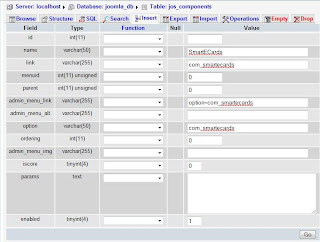
When you click “Go”, the entry will be created.

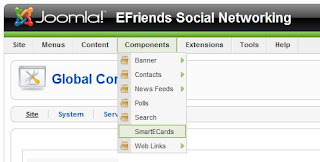
Now if you go to the Joomla! administrator’s page (/administrator/index.php?), you can see “SmartECards” listed under components.


When you click on this, you will get a 404 error message. This is because we haven’t written the code to appear when it is clicked. If you have reached this place, everything is fine up to this point.

Relax a bit :)

I will continue from here in my next post.